Monday, September 08, 2008

Major YouTube Upgrade

I cannot recall when YouTube was as much unavailable for as long as it is today. Something major is cooking.

There cannot be any other reason for this significant outage. You can see the following message on all pages on the YouTube website at this moment.
"We are currently performing site maintenance. Be cool - we'll be back 100% in a bit."


The user profile pages are not accessible. You can log-in and log-out and see a bit about your subscriptions, but that is pretty much all that you can do at your account area. You cannot access your videos (for updates), upload new videos, access ratings, messages or account settings.
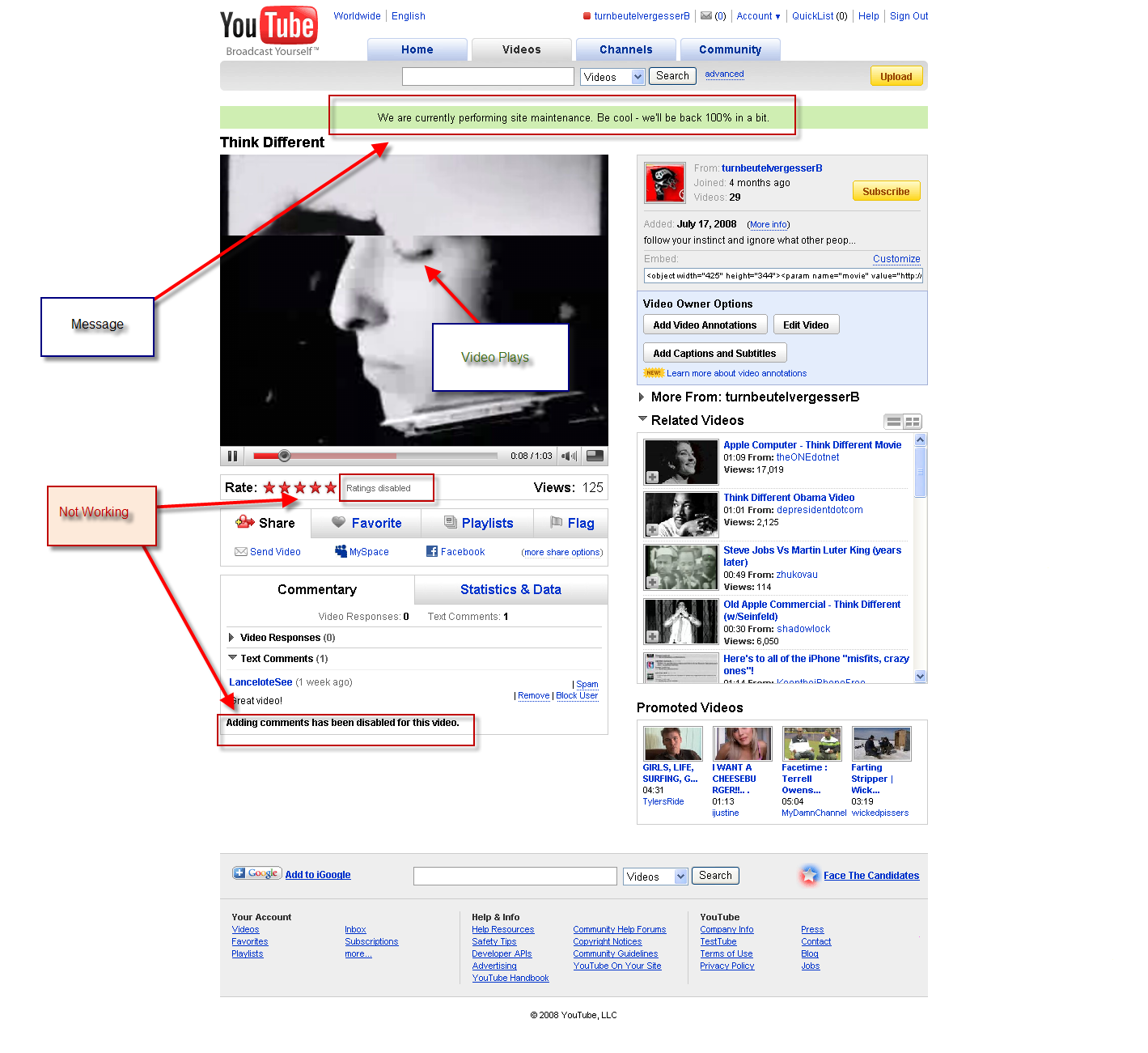


You can access videos via direct URL and play them, but there is no interactivity possible, such as video ratings, adding comments or adding a video to your favorites or a play list.

It also seems that videos embedded in other websites are not working. I noticed problem with that already last night, which means that this update is going on for way over 16-17 hours already. Again, the same video on the YouTube site itself still works.


Image caption: screen shot of video embed in this blog when I tried to play it.

Comments on YouTube Site
Okay, I admit, the user interface of YouTube sucked. They tried to improve things here and there, but it kept on sucking. A major overhaul of it would be great.
Google Video seems to be up, no sign of any upgrades there, although I had some issues with Google Video during the past days. So it seems that Google Video is not going to be merged into YouTube with this upgrade.

Thoughts on Google Video
Google Video seems to have more focused on the search aspect of things and tries to become something like a major Video Search Engine. They do a better job at embedding videos from 3rd party video sharing sites as well as videos that were posted on individual websites, not using a video sharing site for video hosting and distribution.

The "social" aspect of Google Video sucks as always, no improvement there. You don't even have a "user homepage" or anything like that. I figured out a way to create one for my account though. It was tricky, but at the end possible. Comments are buried and not really used (if you can find them). You cannot tell if your videos got comments, which is really "helpful". I wouldn't be able to know about them, if it weren't for a service like TubeMogul, but then again, nobody uses it anyway.

No Restriction of Video Resolution and Length (on my Wish List)
I have tons of videos on YouTube and Google Video and the main reasons for me to continue to use Google Video is the non-existing video length and video file size restriction. You can upload whatever you want and I have several videos that are longer than 10 minutes or exceed the 100 MB limit if you want to keep the video quality decent. The video resolution at Google Video is also higher than on YouTube, even the fairly new and mostly unknown High Definition option at YouTube is a joke. The video resolution might gets up to 480x360, if you are lucky, but that is again related to the size limit of the videos. I did it myself that I scaled a video down to reduce the file size, because YouTube does not play the higher resolution video anyway. I got told though that YouTube keeps the original uploaded video, along side with the encoded one for the use on their website.

It would be nice to see a change in that respect with this upgrade. No limits and higher resolution play back option, 640x480 pixels would be nice, but at least SVCD resolution (480x576 in PAL and 480x480 in NTSC) should become available.

YouTube Messaging Interface Comments
The last upgrade of YouTube, where they introduced a new messaging interface and the annotation and video overlay feature were also not ready for prime time yet. The new messaging interface solved some problems, but at the same time introduced new ones, specifically problems with navigating between comments and messages and content they refer to (comments, videos, user accounts etc.). The annotation feature was also still very buggy. I had to contact YouTube support because it did not work at all for a video when I actually needed it.

Video Update Feature (on my Wish List)
Another thing that bugs me a lot at YouTube and other video sharing sites is the lack of ability to replace a video with an updated version of it. You have to upload the almost identical video again, which many would see as a duplicate and you have to decide, if you keep the old video up (because of comments, favorites, video responses etc.) or if you take it down, delete it or at least set it to private (also something new).

Now people who argue that this would allow all kinds of abuse, like using deceptive switch and bait tactics are to some degree right, but there are options to a solution to this problem. Because there are bad people in the world, is it wrong to assume that everybody is bad until proven otherwise (an impossibility to do btw.). Previous versions of a video could be kept as reference and version history, unless very good reasons were provided for a total removal without a trace.

The option between the two cases would be to only keep as reference the date and time when the video was replaced to indicate that all comments etc. that were made before that date and time, referred to the previous version of the video and not the current one.

Pessimistic Options
Maybe it's all about infringing video content detection and making it harder for people to upload their videos and to give traditional commercial publishers more power to control distribution of "their" content (claiming a bit of content here and there along the way, where they actually own shit). I hope that this is not the case. I am fed up with this crap.

DailyMotion Incident
My YouTube issues from June are still very much in my memory, as well as all the pain it has caused. I just posted in the night from last Thursday to Friday about my updated video version about the Berlin Wall and how I was taking special care about the legal things of it.

Well, I got an email from DailyMotion.com during the weekend that one of the four parts of my video (I had to slice it down for all video sharing sites, except Google Video), were taken down, because of possible copyright infringement... I went... WHAT??? and are in email communication with DailyMotion since then. It's not up again as of now.

I added in my initial response among the requested information about the video content that "I hope that they are better than YouTube, where a large music publisher claimed to own the copyright on another video of mine, where they did not own anything (That's also called theft IMO). I stated in detail that this company can not own any copyright on anything in this video and provided names, emails and mailing addresses of the content creators and a reference to their copyright license, which permits the creation and publication of my video. YouTube did not bother and did not put it back up again. I had to re-upload it and loose all comments, stats and favorites for the original video."

They responded to that email and asked for the URL of the video (which is kind of stupid, since they should know what they did and include a key in the email notification that is being sent as a result of it to the user who uploaded it.), so my comment was not making them upset a la "Of course we are not YouTube!" mentality. Let's see how that one goes.

Well, enough speculating and hoping. It won't be for long anymore (I hope) and we will see what they came up with. Let's hope for the best.

Cheers!
Carsten aka Roy/SAC

Sunday, September 07, 2008

What is ASCII Art? What is ANSI? and more!

I added a significant amount of content to my ASCII Art Academy page on my site. I answered there in short what things are. I explain all this stuff in detail in various articles, but I think it is good to have a short and straight forward version on the main Academy home page as well.


Here are some examples:

What is ASCII Art?
ASCII stands for American Standard Code for Information Interchange and is a text format standard for computers. ASCII art is text art that was created on computers who use this ASCII standard. The text art created on the IBM PC, which use text characters beyond the ASCII standard are also called ASCII, even though it is technically incorrect. The IBM PC become the most widely used computer in the world and people called things ASCII, even if they were not. There is no sense to debate about it, because it won't change what already happened.

What is 7-Bit ASCII?
The difference between 7-bit and 8-bit ASCII is pretty simple, assuming that you have a keyboard with the latin alphabet. 7-bit only uses characters that you can find on the keyboard. 8-bit uses additional characters that you cannot find on your keyboard, but which exist in "text mode" of the old MS DOS operating system. MS DOS hat 256 characters for text mode. Some of them are control characters and not visible, such as Carriage Return, Line Feed (Line Break), the Tab character or the Escape character. The standard US-ASCII characters are the first 128 characters of the character set, where 97 of them are usable for text and ASCII art.

What is 8-Bit ASCII?
8-bit ASCII art uses primarily characters after the 128 characters of the US-ASCII character set. You cannot find those characters on your keyboard and could only generate them via programming code, special editors (like TheDraw or ACiDDraw) or by pressing the ALT-Key and then type the character code (a number between 128 and 255) on your numeric keypad, while keeping the ALT-Key pressed. Those upper or "higher" characters are suitable for basic graphical elements, such as box borders, corners. Those characters are unique to the IBM PC and MS DOS and are not compatible with other operating systems, such as UNIX, Linux or MAC OS, which might also have an extended character set beyond the 7-bit ASCII standard, for which no standards exist..

What is ANSI?
In 1979, the American National Standards Institute (ANSI) passed X3.64-1979 “Additional Controls for Use with the American National Standard Code for Information Interchange”. This standard defines a set of control sequences to manipulate the appearance of the text on the screen of computer terminals, to Bolden text, making it italic or blinking and to add some colors to your text. Microsoft added this standard to their MS-DOS operating system in a device driver called “ANSI.SYS”, which people started simply to refer to as “ANSI”. There are 16 pre-defined foreground colors, where 8 of them could also be used as background color.

The use of ANSI control sequences (called Escape sequences, because they all started with the ESC character) required special editing software, because unlike the 8-Bit upper characters, is there no easy way to generate those sequences by hand. In order for MS DOS to process and interpret those control sequences properly, a special driver had to be loaded, which came with the MS DOS operating system by default. The file for this driver was named "ANSI.SYS". This is where ANSI got his name from, which is sometimes confusing, because ANSI also stands for the American National Standards Institute, the organization who defined the US-ASCII standard.

And more...
I also added examples of the character sets 7-bit and 8-bit and the ANSI color schema. I also added a grid with the mapping of ANSI colors to HTML colors and their ESC sequence code.

New ANSI Tutorial
Another goodie that I finally added was a good and detailed ANSI tutorial by the artist Zerovision of the young ANSI art group called "Blocktronics". It uses the example of a picture that shows the movie character "Chucky" and how he re-created the picture in ANSI. It explains shading techniques and more in detail, why ZV decided to do this versus something else, etc. Very useful for beginners.

Group Update
It is funny, but I joined as of today a new computer group. Something that I didn't do for the past 10 years or so. I thought I am too old for this stuff, but then, it is a revival of an very old group by a bunch of very old guys like me (in terms of Scene life). The group is called "Canadan Pirates Inc." or CPI. A group with roots in Canada (duh) and some cracker scene history. The revived group does not do any cracking and warez anymore though. It will focus on Music, Intros, Demos and also scene history preservation, something that I already do for a few years now.


I chatted today on Facebook with Rod aka MadMax, co-founder of CPI and he asked me, if I would join. I was in touch with Rod for a while already and also had multiple lengthy phone calls about verious things, mostly whining about the lost past hehe. I said yes, so here I am... new member of CPI. :)

Well, that's some news.... I hope you will like the new content. I am out of here now.

Cheers!
Carsten aka Roy/SAC (and CPI)

Thursday, September 04, 2008

The Berlin Wall History - Lessons Learned ... Again

I did a long and detailed post about the Berlin Wall in June, titled "The Berlin Wall and the Walls between Us". It also included a 13 minutes extended edition of my video "Berlin Wall - Lessons Learned". It was already version 3 of the video (Here are the links to version 2 and version 1 of the video as well, just for the sake of completeness).

Why the different versions? Well, there are multiple reasons.

First, I improved my editing skills and was able to do things better where I was unhappy about in a previous version of the video.


I also got access to new or sometimes just better quality sources. One of the latest discoveries was a high quality video version of the episode "The Berlin Wall" from the National Geographic TV series "Turning Points Of History". That 45 minutes documentary virtually contained the video snippets of all my video sources about the 1950-1970s that I already had from elsewhere (stock footage, public domain etc.), but in much better quality.

I spent the last few days on version 4.0 of my video. This time I did re-created it entirely from scratch. It's not just an edit of the previous version. I even re-cut, re-edited and re-sorted the sources again. This version is a whopping 30 min (almost) long.

Note: Google Video messed something up. It shows only the first 5:41 minutes of the video. I will re-upload it again and try to figure out what the problem is. Once I have the full 30 minutes version up and working, I will update the links in this post.

Google Video seems to be fine again. I used the Google issue period to make some enhancements to the video. It is now also slightly longer than before and surpasses the 30 minutes mark now. (30:20 min or something like that). I also updated the Link to Mediafire.com and got the AVI file-size reduced thanks to the use of H.264 video and AC3 audio compression. It's about half the size of the previous Xvid/Mp3 encoded version, which I deleted.


I also refrained from using any music that might infringe a little bit copyright here and there. It is using all Classic music (with the creators dead for far longer than 50 or 70 years). It is in some cases matching even better than the music that I used before, but unfortunately not always. I had to make some compromises for the sake of legal purity :).

Music Credits
  • Samuel Barber "Adagio for Strings"
  • Richard Strauss "Also sprach Zarathustra"
  • Richard Addinsell "Warsaw Concerto"
  • Carl Orff "Carmina Burana, 1st mvt 'O Fortuna'"
  • Franz Schubert "Serenade"
  • Georges Bizet "Carmen Suite No. 1 & 2"

I don't think that using the National Geographic documentary footage (logo blurred out) is an issue, because they also just used stock footage from CNN and other media sources. This video is not commercial in nature and CNN and others should not have a problem with my use of their stock footage.

So here is the 30 min video

Feel free to comment and tell me what you think about the video. I am also open for any suggestions, praise and criticism :).

Cheers!

Carsten aka Roy/SAC